Making funeral bookings work online, with a pastor’s confirmation
Booking a pastor for a funeral ran on a chain of phone calls. I led the project as product manager and designer, on a budget and deadline agreed before I joined, and built booking into the calendar and forms parishes already used. Funeral coordination went from days to hours, and the same capability then shipped to every ChurchDesk customer.
Funeral bookings by request, with the pastor holding the final yes
- The setting
- ChurchDesk, church management software for churches in Germany, Denmark, the UK, Sweden, Norway and Switzerland. The launch customer, the Evangelische Kirche von Kurhessen-Waldeck, needed funerals bookable for and by 20+ cemeteries.
- My part
- Product manager and designer on the project, and its lead. The €20,000 of client funding and the two-month deadline were agreed before I joined; I was chosen to lead the delivery.
- What changed
- Funeral coordination went from days to hours: about 70% less time, by my estimate from the customer's account of the calling it took before. The booking acceptance rate was 90%. The capability then shipped to the whole customer base, for room rentals, baptisms and weddings too.
- Three takeaways
- Start from the customer's synthesis when they bring one. Give the party with the most to lose the final yes, as a mechanism. Pick the scope that makes the second use case cheap.
The brief arrived on a flipchart, in the customer's handwriting
Before the project started, the launch customer had run its own design-thinking workshop. The flipchart from it names three groups, funeral directors, parish assistants and pastors, with a goal for each. Its headline: “Das Herumtelefonieren hat ein Ende.” No more phoning around.
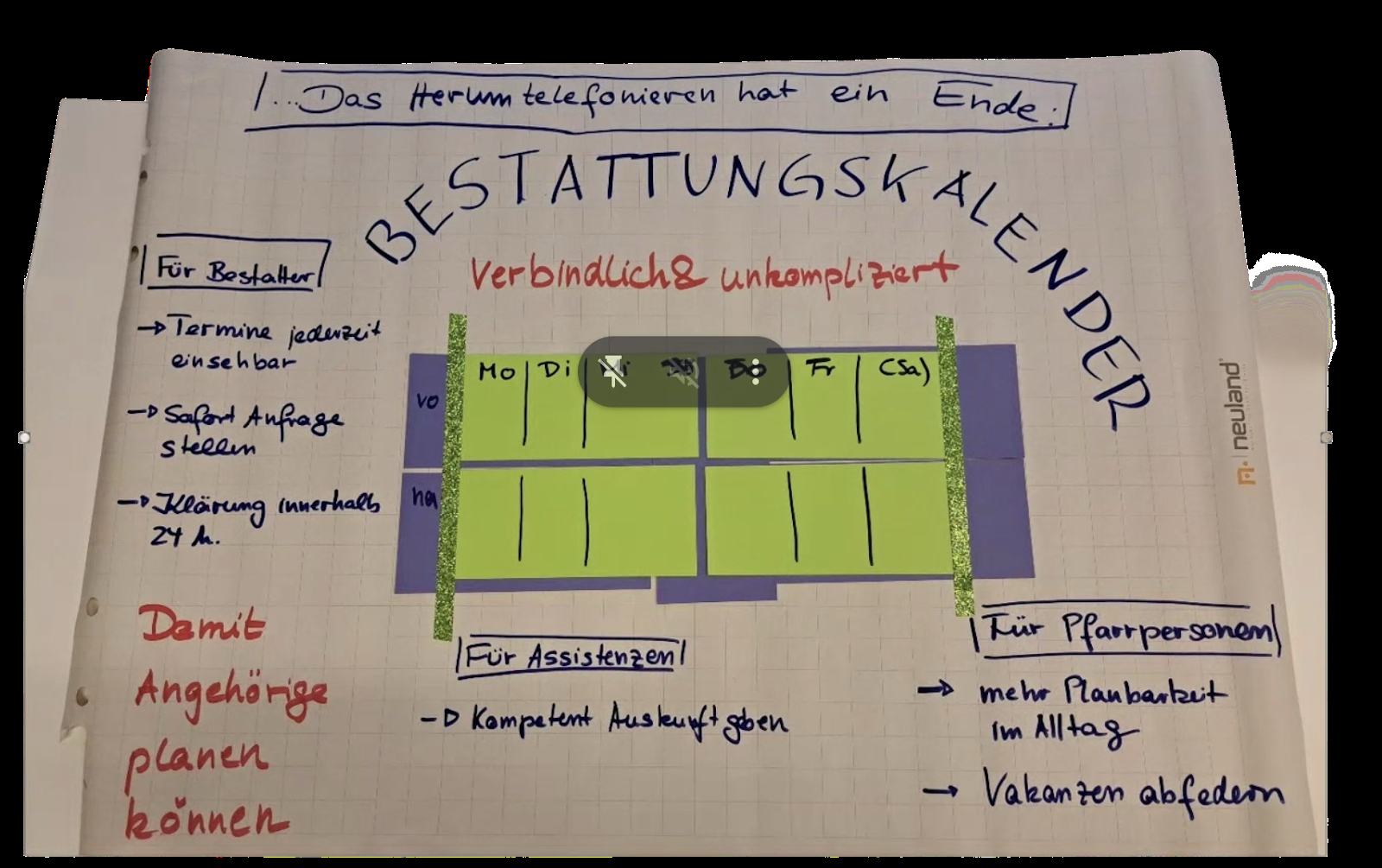
The vision sheet from the church's own design-thinking session. The headline, ‘Das Herumtelefonieren hat ein Ende’ (no more phoning around), is the customer's phrase, not mine. So is ‘Damit Angehörige planen können’: so that bereaved families can plan.
The phoning was a chain: the family calls the funeral home, the funeral home calls the parish office, the parish office calls the pastor, and when the proposed time doesn't work, it goes back and forth by phone until a slot is found. Another line from the workshop: “Damit Angehörige planen können.” So that bereaved families can plan.
I started from their synthesis rather than running primary research from scratch. Concepts were tested in recurring calls with the customer's project lead, and with pastors and funeral directors, partly in person, as the design firmed up.
A booking system where the resource is a person with a schedule
The interviews the customer had already run said it plainly: pastors did not want to be “booked,” and the church still wanted to be more service-oriented toward funeral homes. The slot belonged to a pastor, the pastor had to check it against a cemetery's opening hours, and the parish office sat between the pastor and the funeral home.
Anything you schedule where the provider has to stay in control, a specialist, a venue, a person with judgment, carries the same tension. The control has to be built into the booking itself.
Two months, €20,000, and a yes nobody could force
The commercial frame was set before I arrived: €20,000 of client funding, two months to development release, funeral booking as the launch case. I was chosen to lead the delivery inside it, in a dual product-management and design role.
The internal expectation was a standalone add-on module, the faster path.
I read the customer's two words as two promises. Binding, for the funeral home: a confirmed answer. Uncomplicated, for the pastor: no second tool to learn, and no booking they would only have to cancel.
The internal plan was a standalone module. I built it into the calendar instead.
Buying a booking tool was an early question, dismissed quickly. What parishes needed most was a custom intake form per parish, and no third-party booking vendor was set up for that. Calendly, the obvious reference point, has a fixed booking form and doesn't offer white-labeling.
The harder choice was a standalone module or deep integration. Cemetery opening hours in the pilot region ranged from Thursdays at 9am only to every day 10am–4pm. A new tool that captured on-call availability across 5+ cemeteries with irregular hours could easily demand hundreds of clicks to enter, and that friction is what would have stopped pastors and parishes from adopting it. The calendar pastors already used was the natural place for that complexity.
So I delivered a booking capability embedded in the platform, general enough to carry the use cases customers asked for most, and a stronger answer on the funeral case itself than the add-on would have been. I built it the integrated way to unlock more use cases, for the customers and for the company.
How the system fits together
The pastor enters availability once, in the calendar they already use. Their other events, the cemetery's hours and the booking option's own rules then narrow it, and only what remains reaches the funeral home's booking page.
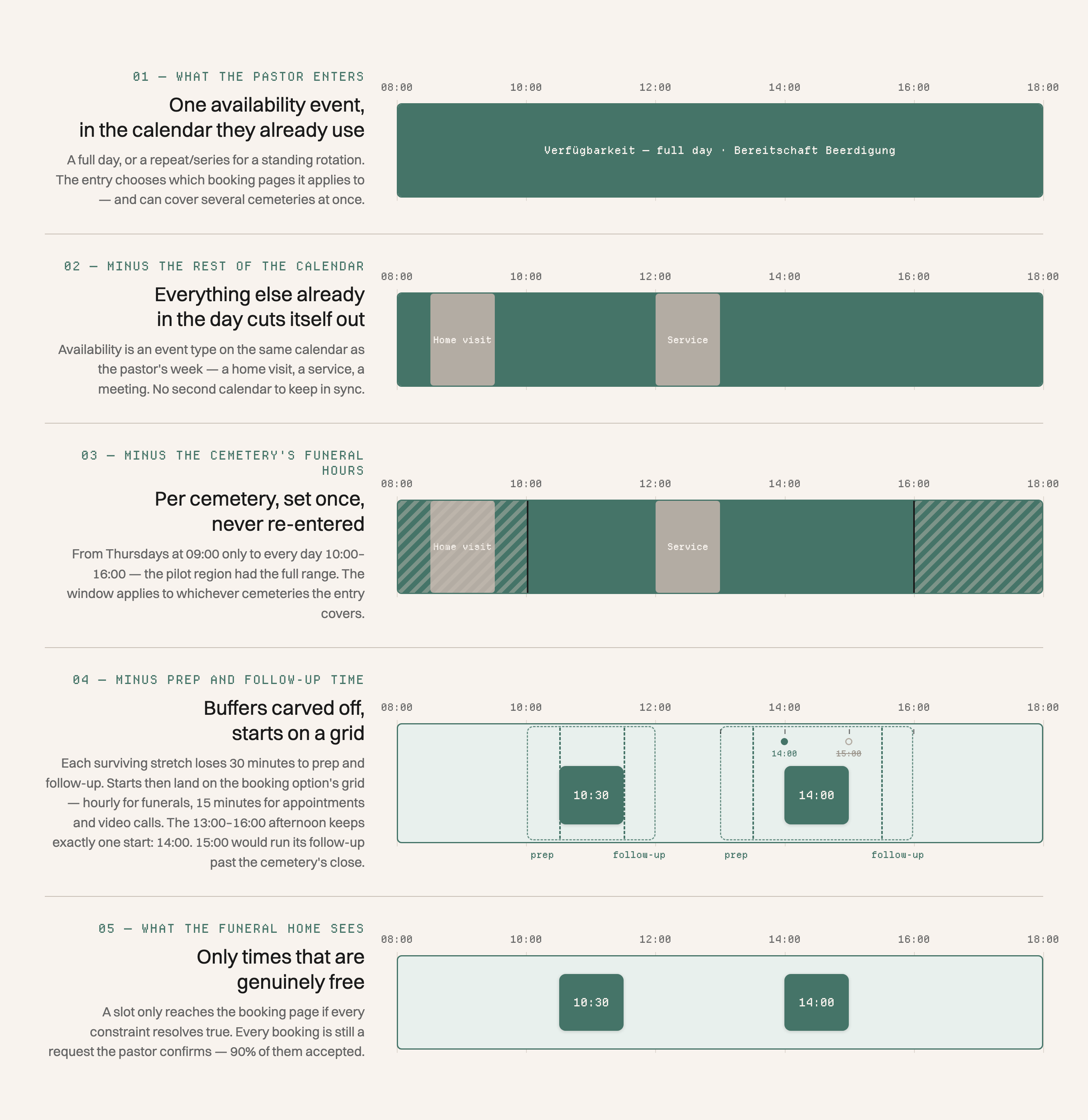
The whole filtering chain in one picture. The pastor enters availability once, everything else cuts itself out, and what survives reaches the booking option's start grid. A slot only appears if every constraint resolves true, and even then it is a request the pastor confirms. The day shown is schematic.
-
Availability is its own calendar entry
Availability is a new entry type in the ChurchDesk calendar, the one the pastor already plans in: a full day, or the calendar's native event series for a standing rotation. Each entry chooses which booking pages it applies to, and each page can carry its own hours, so a cemetery's hours never have to be re-entered.
-
One entry covers several cemeteries
A single availability event applies across several cemeteries at once, so the pastor doesn't set each cemetery separately.
-
The parish builds the intake form, and the follow-up
The form step is ChurchDesk's own form builder, so a parish asks its own questions, including a file upload. The same builder is reused after the booking for a required follow-up form: the death certificate for a funeral, a signed consent form for a youth camp, a rental agreement for a room.
-
Every booking is a request the pastor confirms
The pastor is notified in the ChurchDesk app and by email, and accepts or can't do it. A 48-hour minimum lead time keeps out bookings the pastor would only have to cancel, and a buffer between bookings prevents overbooking; both are standard booking-system functionality. Starts sit on a grid per booking option: hourly for funerals, 15-minute increments for appointments and video calls.
-
One filter for people and equipment
A booking option can carry opening hours and resources, a room or a projector or a barbecue set, all on the same calendar as the pastors. A time only reaches the booking page if every person and every resource attached to it is free at once.
Coordination fell from days to hours, and the capability outgrew funerals
The 70% is my estimate, not a tracked figure. It rests on the customer's account of the old way: hours, sometimes days, of calling. The booking page now shows only slots that are actually free, with the on-call schedules behind the scenes. That means significantly less calling, and a higher acceptance rate, reached faster.
 View full size ↗
 Both figures follow from the embedded-capability call.
I sequenced the rollout from the launch customer to the wider customer base. The same availability model and form builder carried the new uses; nobody built a second engine.
- Coordination time
- Days of phone coordination between several parties Hours for a complete funeral arrangement: about 70% less, by my estimate
- Booking acceptance rate
- 90%, through filtering that only offers workable times
- Delivery
- Two months and €20,000, both agreed before I joined Both met
- Adoption
- The launch customer needed funerals bookable for and by 20+ cemeteries. The capability then shipped to ChurchDesk's whole customer base, for room rentals, baptisms, weddings and youth-camp sign-ups.
The request goes out instead of the phone ringing
A family still calls a funeral home first. From there, a request lands on the pastor's calendar, and the pastor accepts it or says they can't. The times on offer have already cleared every constraint.
“Das Herumtelefonieren hat ein Ende” was the customer's goal before the build started. Two months later it read like the system's job description.
Before you build a booking flow around a person's calendar
-
Start from the customer's synthesis when they bring one.
This customer's workshop had already named the groups and a goal for each. The work then is translation and validation with each group as the concepts firm up.
-
Give the party with the most to lose the final yes, as a mechanism.
A request-and-confirm step plus a minimum lead time. The test: can a booking exist that the provider would only have to cancel? If yes, the control is still a promise.
-
Pick the scope that makes the second use case cheap.
Before you commit, name the next three things the capability must carry. If the plan can't carry them, you will pay for the second one anyway.
A standard scheduling tool is enough when the booker owns the slot
When the person booking owns the slot, and a fixed set of fields covers the questions, a standard scheduling tool is the right answer. Request chains and custom forms would be complexity without a job.
This setup earns its weight when someone with something to lose has to stay in control, and every customer asks different questions before it confirms.
Want to hear more?
- Send me the coordination loop your team still runs by phone: who calls whom, and whose yes nobody can force. I'll tell you whether it needs a request chain like this one or an ordinary scheduling tool.