Working app prototypes that engineering builds from
For the Bibel TV app redesign I prototype in real code, against real data, and against APIs I set up myself where the production API didn't carry the data yet. What reaches engineering is an app that already runs. A code comparison measures how much of it they build from.
Engineering builds the redesigned Android Home and detail views from my prototype
- The setting
- The redesign of the Bibel TV streaming app, iOS and Android. I'm Head of Product Design and, for the redesign, the reason my contract exists, also its product manager and product owner.
- My part
- I set the direction in Figma, then prototype in Claude Code against real data: web first, then the same prototype continued as a native Kotlin and Jetpack Compose app. Users and stakeholders give feedback by using the working app.
- What changed
- 64% of the code behind the redesigned Home and detail views of the Bibel TV Android app (release 6.0, in beta) comes verbatim from my prototype; for the design system and tokens it is 95–100%. Measured by code comparison against release 6.0.8, a lower bound. A separate teardown of a pre-release 6.0.2 build found 93.1% of the design-token field names.
- Three takeaways
- Build the prototype where the largest share of your users are. Hand over something that runs on real data. Leave the build to engineering, and measure what survives.
Two card treatments, the same real episodes
On the Home screen of ProtoBible, my Android prototype, two rows show the same Bibel TV episodes. One row uses one card treatment, the second row another. The episodes are real, loaded from Bibel TV's own content.
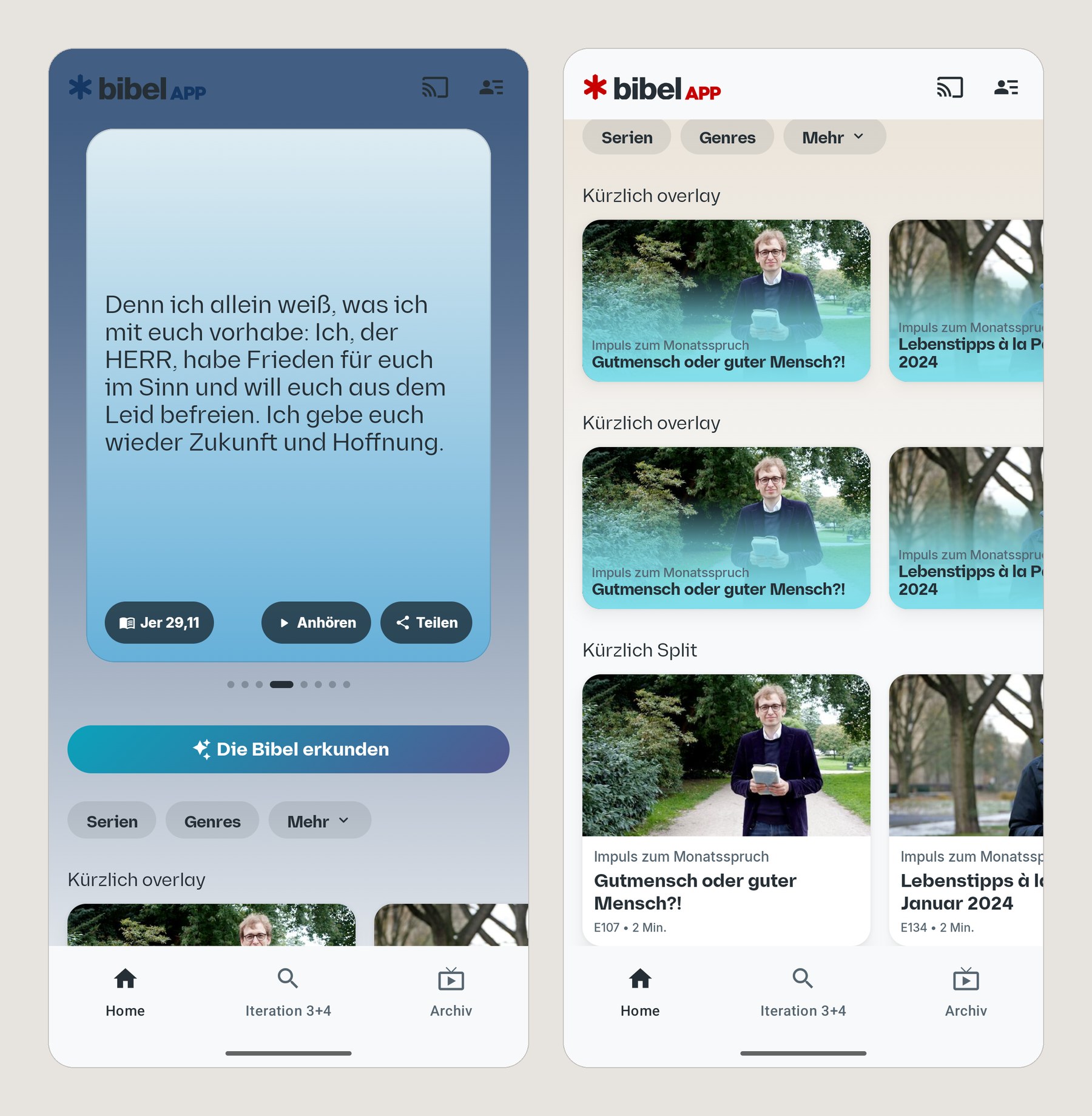
ProtoBible, the Kotlin and Jetpack Compose prototype, running on real Bibel TV episodes. The rows put two card treatments side by side on the same content, so the choice is made on what renders, not on a mockup. Captured on an emulator from the October 2026 debug build.
So the choice between the two cards gets made on what actually renders. A mockup would have shown each card at its best.
A spec leaves the rendering for later
A spec and its redlines describe a screen. The interaction states and the actual rendering get discovered later, by whoever builds it, once a build exists.
That gap costs the most when the people building sit in another company. Every open question becomes an interpretation made by people you don't sit with.
The prototype became the handoff
I still start in Figma, with layout, flow and hierarchy. Exploring design directions stays manual work, by choice: the direction had to be my own judgment, in line with the new on-air brand.
Once the direction is set, I switch to Claude Code and prototype the interfaces with real data. That surfaced issues and edge cases we would not have found in Figma alone. Where the production API didn't carry the data yet, I set up custom APIs so the prototype could still run on real data.
The prototype moved to Android, where the largest part of the users are
The web prototype came first. Mobile browser interfaces have a lot of browser chrome, and the gradient-heavy interface had to be checked against older Android devices prone to banding. A stakeholder had raised that worry: old Android screens in the userbase render gradients badly.
So I continued the same prototype as an Android app in Kotlin and Jetpack Compose. Android was the right place to build anyway. It is the largest part of the Bibel TV userbase.
Both versions let users and stakeholders give feedback by actually using the app, which a presentation can't offer.
From concept to engineering's build, in five steps
Direction first, then the real thing on real data, then the device the users have.
 View full size ↗
 What engineering receives: a spec and redlines to interpret, or a working prototype already running against real data.
-
Concept in Figma
Layout, flow and hierarchy, before any code exists. Exploring design directions stays manual, by choice.
-
Prototype in Claude Code, against real data
A working build against the real Bibel TV API, or against a custom API I set up where the production API doesn't carry the data yet.
-
Test on the device that matters
The web prototype continued as native Kotlin and Jetpack Compose.
-
Sessions on the working app
Users and stakeholders use the app instead of watching a presentation of it.
-
Engineering builds from it
Engineering took over the look and built its own data access, view logic and navigation. The code comparison below measures how much of the prototype stayed.
Measured, two ways: how much of the prototype is in the app
Release 6.0 is in beta, so this measures how the redesign is being built. It isn't a consumer number. Two methods answer how much of what I hand over survives. A teardown of a pre-release 6.0.2 build checked the design tokens and data contracts field by field, but it can't see component code. A code comparison of my prototype against release 6.0.8 can: it counts verbatim blocks of Kotlin in the redesigned Home and detail views.
 View full size ↗
 Two shares from one code comparison, kept apart from the teardown figures.
 View full size ↗
 A separate measurement by a different method: a teardown of a pre-release 6.0.2 build, which checks tokens and data contracts but cannot see component code.
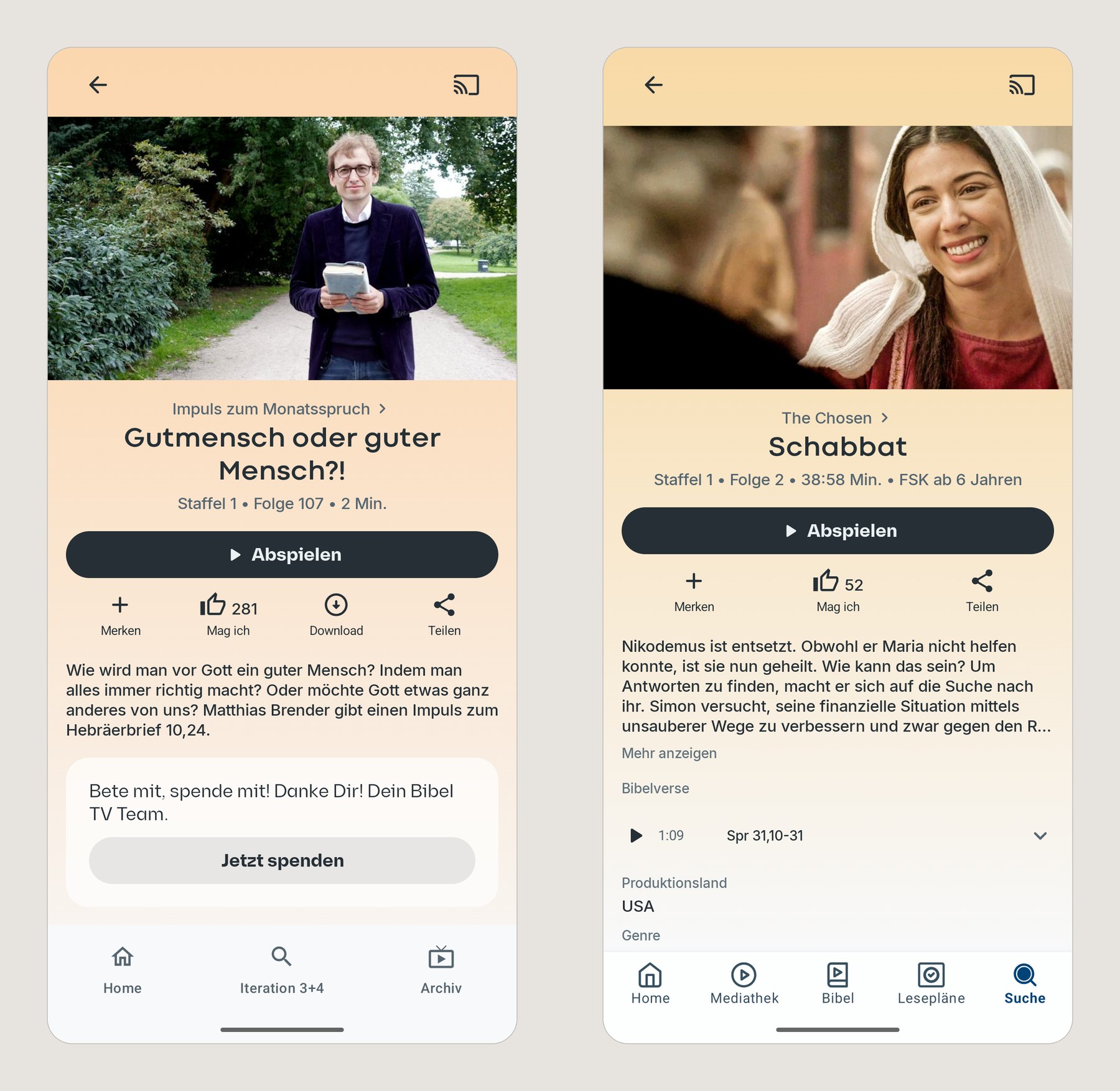
Left: the video detail page in the prototype, whose detail redesign I committed on June 12, 2026 and its Bible-verse section on June 18. Right: the same page in the 6.0.7 build of the Bibel TV Android app, October 1, 2026. Same structure; the figures above come from a teardown of the earlier 6.0.2 build and a code comparison against release 6.0.8, not from how alike they look.
Run against the previous app version, 5.15.5, the same comparison matches 0.03%. The matches with 6.0 are copies, not coincidence. By layer, the design system and tokens carry over at 95–100%, while screen frames and view logic, at 2–3%, are engineering's own.
- What engineering receives
- A spec and redlines to interpret A working prototype, already running against real data
- Design-token fields found in the pre-release 6.0.2 Android build
- 93.1% of token field names (353 of 379), 94% of the Kotlin token model (443 of 473), confirmed via a teardown of a pre-release build
- Prototype code in the redesigned Android views, by code comparison
- 64% of the code behind the redesigned Home and detail views of the Android app (release 6.0, in beta) comes verbatim from my prototype; 95–100% for the design system and tokens. A lower bound: code engineering adapted or renamed is not counted
Want to hear more?
- Two things from this project are worth a call if your handoff crosses a company boundary too: what the 0.03% control run proved, and why the prototype moved from the browser to Kotlin.